|
Hey, it's Ryan. | Imagine hiring an employee who never forgets, never sleeps, and never asks for a raise…that's AI, if you set it up the right way. | This week, I'm sharing the 5-step system we use to "hire" AI employees that actually function like team members. Inside, you'll discover: | The "clone test" that reveals which AI role you should hire first The job description template that turns AI from random chatbot into reliable specialist The onboarding process that makes your AI employee instantly fluent in your products, brand, and playbooks How to train AI the way you'd train a new hire (only faster, and it never forgets) The path to scaling from one AI assistant to an entire AI-powered org chart
| If you've been dabbling with prompts but wondering when AI will finally deliver real leverage in your business, this is the blueprint. | Let's get into it… | P.S. I'll be doing a full session on how we build AI employees (and plenty more) at Get Scalable Live…3 days, 700+ founders, zero fluff. If you're serious about building a business that can run (and grow) without you, this is the room to be in. | (Accidental MBA Subscribers Save $800 + 25% with code: amba) |
|
|
|
The AI-Powered Org Chart | READ TIME: 2 min. 55 sec. |
|
|
Most CEOs are still treating AI like a toy. |
They're asking it to draft an email, summarize a meeting, or review an agreement…but that's about it. |
The real breakthrough happens when you stop thinking of AI as a tool and start treating it like a team member. |
That's why we created what I call The AI Org Chart. It's a simple, five-step system for hiring, onboarding, and scaling AI inside your business just like you would a real employee. |
Here's how it works: |
Step 1: Decide Who to "Hire" |
Don't start with random prompts. Start with a role. Ask yourself: |
If you could clone one team member, who would it be? Who do you email or Slack the most? Who (besides you) is the biggest bottleneck?
|
Once you know the AI employee you want to "hire" first, open up the Projects feature in ChatGPT or Claude and name your Project after the "employee" you want to "hire." |
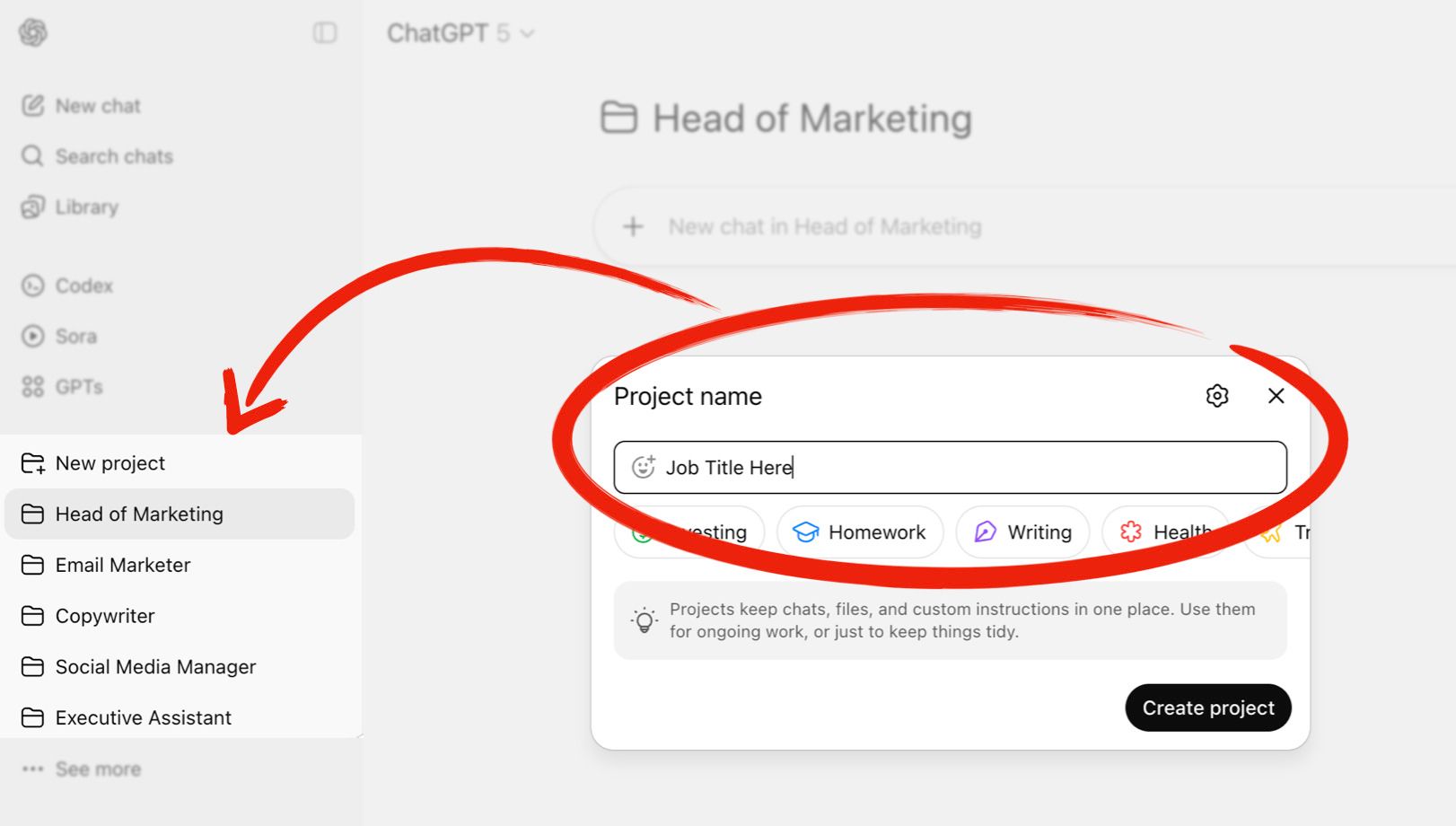 | Project Name = Employee Name |
|
Want an AI Head of Marketing? Name it "Head of Marketing." |
Want an AI CFO? Name it "CFO." |
Simple. |
Step 2: Write the Job Description |
Just like your human team members, AI employees perform at their best when they have clear expectations about what they do as well as the knowledge and "experience" they should have. |
That's why you need a clear job description that include: |
Role & Department – Who they work for and how they fit in. Behavior Guidelines – How you want them to "think" and communicate. Core Responsibilities – The actual tasks you expect them to handle. Knowledge & Experience – The frameworks, models, and industry knowledge they should apply. Boundaries & Scope – What they cannot do without human review. Output Structure – How you want the deliverables formatted and presented.
|
Once you've written this job description, add it to the Instructions section in your Project. |
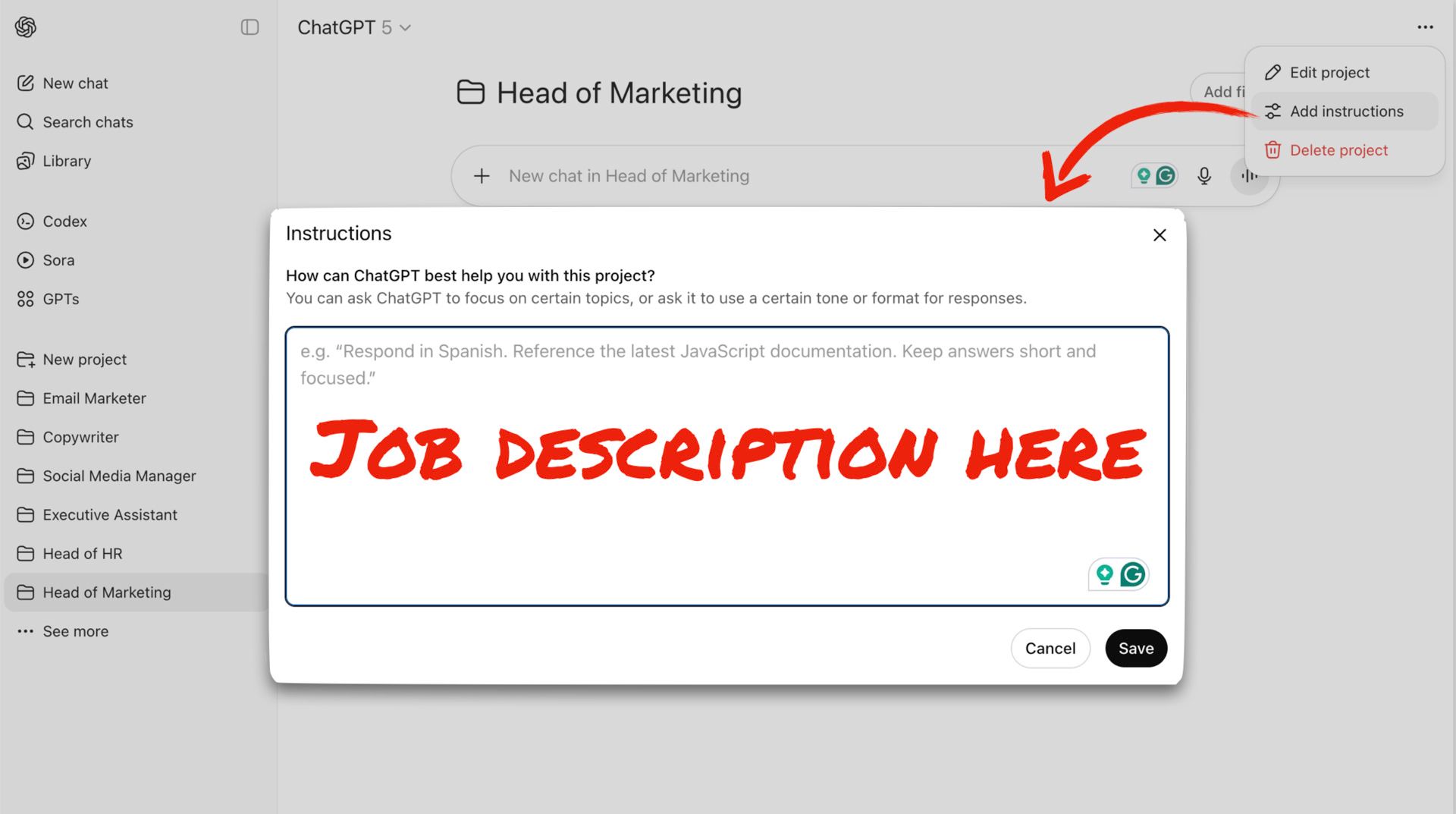 | Project Instructions = Job Description |
|
Now your AI knows what's expected of them, and unlike a human employee, they'll never forget it. |
Step 3: Onboard |
You wouldn't expect a new hire to show up and magically know the ins and outs of your business and brand. Same with AI. |
Feed your AI all your product docs, competitor analysis, swipe files...anything you'd want a real employee to master…resources like: |
Product & pricing catalogs Brand voice & tone guides Visual style guides Competitive landscape overview Metric benchmarks/scorecards Ideal Client Profiles Core Message Canvas Org Chart Company Policies Examples, controls, best practices, etc.
|
Drop these files right into your Project Files, and your AI employee will learn them instantly (and never forget them). |
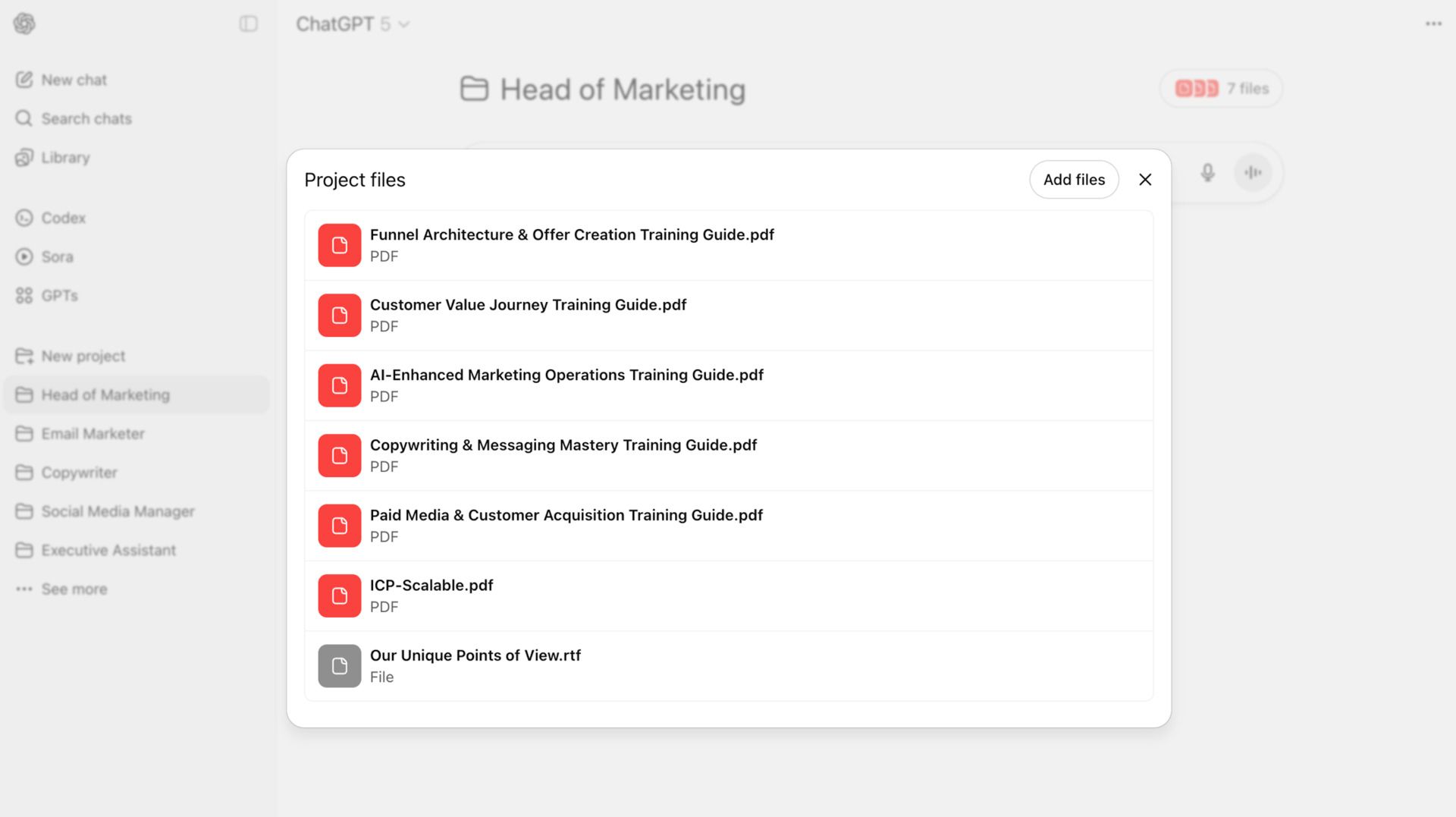 | Project Files = Employee Onboarding and Training |
|
Step 4: Train |
Keep adding examples, transcripts, and real-world data to the Project Files. Things like: |
Winning tests and controls New examples, best practices, and swipe files Industry reports & PDFs YouTube video transcripts Podcast transcripts Transcripts of courses w/ handouts
|
Every new piece of training makes your AI "employee" sharper and more valuable. |
No more wondering if someone watched that training you sent them...your AI employees always do (and again…they never forget). |
Step 5: Scale |
Once it's working for you, share the Project with your team, spin it into a custom GPT, or eventually evolve it into a fully autonomous agent. |
Here's the bottom line: AI doesn't replace your people…it multiplies them. By staffing your company with digital "employees," you'll offload repetitive work and give your real team more leverage. |
⚡ Action Step: This week… |
Pick ONE AI role to "hire" (Copywriter, CFO, or Head of Marketing). Write a job description and paste it into your Project Instructions. Upload at least 3 training files (docs, transcripts, or reports). Assign them a first task you'd normally handle yourself.
|
By tomorrow, you'll have your first digital employee on payroll, and unlike a human hire, they'll always do what you tell them to do…never show up late…and never ask for a raise. |
|
Give it a shot and let me know how it works. |
|
|
Ryan Deiss
Co-Founder and CEO, The Scalable Company |
|
|
P.S. We're currently working with our clients to help them build entire departments of AI employees. If you're interested in learning more (and possibly becoming a client), you can click here to get the details. |
|
Quick Hits |
Here's some other content from the Scalable network, plus some other cool stuff I liked and thought you might like, too: |
|
|
|
 | Ryan Deiss @ryandeiss |  |
| |
Step 1: Start a business.
Step 2: Make money.
Step 3: Build a team.
Step 4: Somehow become everyone's manager, therapist, and IT help desk. Nailed it. Anyone else? Just me? | | | 5:36 PM • Sep 25, 2025 | | | | | | 16 Likes 0 Retweets | 5 Replies |
|
|
|
|
How'd you like today's newsletter? |
|




No comments:
Post a Comment